Personal details
Professional summary
Work experience
Education
Skills
Projects
Languages & certifications
Your resume saves automatically in this browser.
User Guide
Step 1 — Pick a template
- Choose a professional design from the gallery, then set your accent colour and font.
Step 2 — Fill in your details
- Add your contact info, summary, work experience, education, skills and projects. Add or remove entries as needed.
Step 3 — Preview live
- Your resume updates in real time in the chosen template — tweak wording and layout until it looks right.
Step 4 — Download
- Export a print-ready PDF or an editable Word (DOCX) file, or print directly. Your draft auto-saves in this browser.
About the Resume Generator
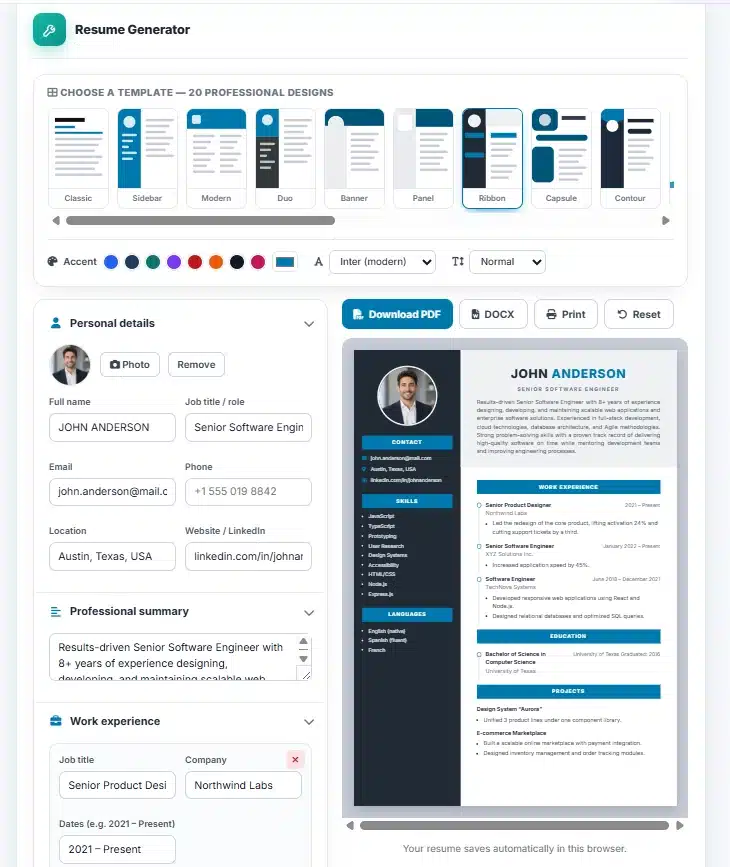
The AMTake Resume Generator turns a simple form into a polished, professional resume in minutes. Choose one of several professionally designed templates, fill in your details, and watch your resume build itself in a live preview as you type. When it looks right, download a print-ready PDF or an editable Word (DOCX) file — no design software, no sign-up and no watermark.
Thirteen professional templates
Switch between thirteen distinct layouts with a single click — from a clean classic and an elegant serif executive to bold two-tone sidebar, banner, ribbon, capsule and editorial designs, plus an ATS-friendly plain format that applicant tracking systems parse perfectly — and your content instantly re-flows into the new template. Set any accent colour from the swatches or a custom colour picker, choose a font, adjust the text size, and add a profile photo for the templates that use one. It is easy to try several looks and pick the one that best fits your industry and role.
Everything a strong resume needs
Add a professional summary, unlimited work-experience and education entries, a skills list, projects, languages and certifications. Experience and project highlights accept one bullet per line, so your achievements render as clean, scannable bullet points. The A4 preview shows exactly how the finished page will look, so there are no surprises when you export.
Private by design, saved automatically
Everything runs entirely in your browser — your resume is never uploaded to a server, and your draft is saved automatically in your browser so you can close the tab and come back later. Export a crisp PDF for online applications, a DOCX when an employer or ATS asks for Word, or print straight from the page. For a matching application, pair it with the Cover Letter Generator.
Frequently Asked Questions
Is the Resume Generator free?
Yes — completely free with no sign-up, no watermark and no limits. You can create and download as many resumes as you like.
Can I download my resume as a Word document?
Yes. You can export a print-ready PDF or an editable Word (.docx) file, or print directly from the page. The Word version is clean and editable, though not a pixel-perfect copy of the PDF design.
Are my details kept private?
Absolutely. The tool runs entirely in your browser — your information is never uploaded to a server. Your draft is saved only in your own browser, on your device.
Will my work be saved if I close the page?
Yes. Your resume auto-saves locally in your browser, so it will still be there when you return. Use the Reset button to clear it and start fresh.
Can I add my photo and brand colour?
Yes. You can upload a profile photo (used by the photo-based templates) and set any accent colour to match your personal brand.