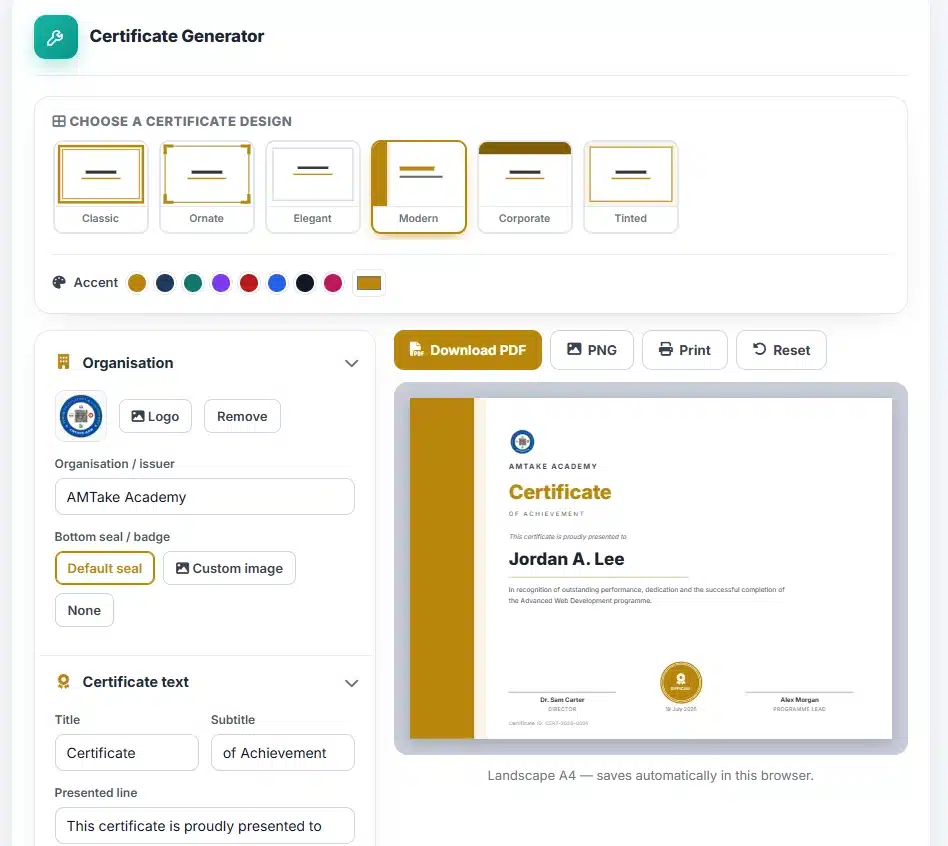
Organisation
Certificate text
Signatories
Landscape A4 — saves automatically in this browser.
User Guide
Choose a design
Six templates are offered. Classic and Ornate use traditional double-rule and cornered borders for awards and completions. Modern and Corporate use sans-serif type and a colour band for company recognition. Elegant is spare and airy; Tinted washes the whole page in your accent colour.
Write the wording
Enter the organisation, the recipient’s name, and the description of what is being recognised. Get the recipient’s name exactly right — spelling it wrong on a certificate is worse than not issuing one, and it is the single most common mistake.
Add a logo and set the accent
Your logo sits at the top. The accent colour drives the border, the title and the seal together, so one change restyles the whole certificate consistently rather than leaving mismatched elements.
Pick the seal
Three choices: the default seal drawn in your accent colour, a custom image if you have an official stamp, or none for a cleaner look. A real organisational stamp uploaded as an image is what makes a certificate look issued rather than made.
Download
PDF is the one to send or print — it is laid out as landscape A4 and prints at the right size on ordinary paper. PNG gives an image for a website, a slide or a social post. Print goes straight to your printer.
About the Certificate Maker
Certificates mark completion, achievement and thanks, and a poorly made one quietly undercuts what it is meant to honour. The difficulty has never been the design — it is that ordinary document tools resist landscape layout, full-bleed borders and centred type, and the result usually shows.
Why it is built at a fixed pixel size
The certificate is laid out at exactly 1123 × 794 pixels. That is not arbitrary: it is A4 landscape at 96 pixels per inch, A4 being the 297 × 210 mm size defined by ISO 216. Fixing the canvas to the proportions of the paper means what you see on screen is what lands on the sheet, without scaling, cropping or an unexpected margin — which is the failure mode people discover after printing thirty copies with the border cut off down one side.
How the file is generated
The design is live HTML and CSS. Download captures that element to a canvas and writes it into a PDF page sized to match, entirely within your browser. Recipient names, your logo and any uploaded seal never leave your device, which matters when you are producing certificates for a real class or staff list.
Because the page is captured as an image, the PDF holds a picture of the certificate rather than selectable text. For a document intended to be printed and framed that is the correct trade — it guarantees the fonts and layout survive on any machine that opens it.
The certificate identifier
Each certificate carries an ID. That is what separates a record from a decorative sheet: it gives you something to write in a register and gives the recipient something to quote when an employer asks them to substantiate the claim. Keep your own list of issued IDs — a certificate you cannot confirm you issued is worth very little.
Getting a good print
Use 160gsm paper or heavier. Standard 80gsm copier stock is the single biggest reason a well-designed certificate still looks cheap, and the upgrade costs very little. Print one proof, check the recipient’s name on it, then check it again before running the batch.
Frequently Asked Questions
Can I make several certificates at once?
Not as a batch. Each is produced individually, so for a class you would change the recipient name and download again. The other details stay in place between downloads, so it is quicker than it sounds.
Should I download PDF or PNG?
PDF for anything being printed or emailed as a document — it holds the exact print size. PNG when you need an image for a web page, a slide or a social post.
What is the certificate ID for?
It gives each certificate a reference you can record and a recipient can quote. It is what allows you to confirm later that you did issue it, which is the practical difference between a certificate and a picture of one.
Can I use my own official seal or stamp?
Yes. Choose the custom image option and upload it. An image with a transparent background sits best over the certificate; the Background Remover on this site can produce one.
What paper should I print on?
160gsm or heavier. Standard 80gsm copier paper is the main reason a well-designed certificate can still look cheap, and heavier stock costs very little more.
Are recipient names uploaded anywhere?
No. The certificate is assembled and exported in your browser, so names, logos and seal images never leave your device.