User Guide
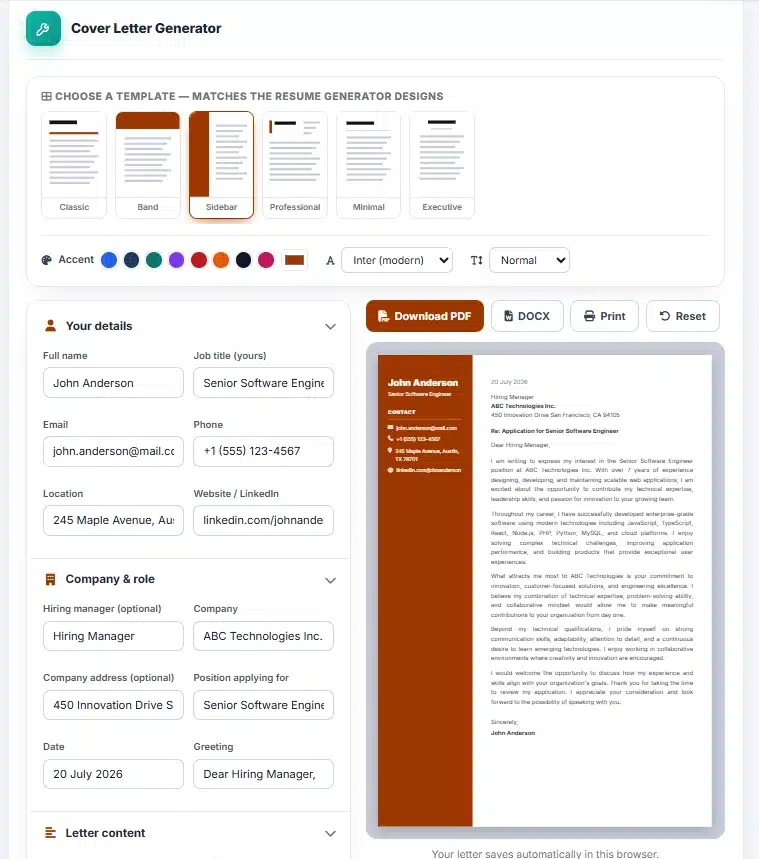
Step 1 — Pick a template
- Choose a design that matches your resume, then set the accent colour and font.
Step 2 — Fill in the details
- Add your contact details, the company and hiring manager, the role you are applying for, and your letter paragraphs.
Step 3 — Preview live
- The letter formats itself in the chosen template as you type — adjust wording until it reads perfectly.
Step 4 — Download
- Export a print-ready PDF or an editable Word file, or print directly. Your draft auto-saves in this browser.
About the Cover Letter Generator
The AMTake Cover Letter Generator turns a short form into a polished, properly formatted cover letter in minutes. Add your details, the company and hiring manager, and your letter paragraphs — the letter lays itself out in a live preview using the template you choose, ready to download as a print-ready PDF or an editable Word file. No sign-up, no watermark.
Matched to your resume
The templates share the same design language and accent-colour system as our Resume Generator, so you can send a matching resume and cover letter that look like one professional package. Choose the same template family and accent colour in both tools for a consistent application.
Proper business-letter formatting
Dates, addresses, subject line, greeting, body paragraphs and sign-off are all placed correctly for you, so the letter follows the conventions recruiters expect. Everything runs in your browser — your letter is never uploaded anywhere, and your draft saves automatically so you can come back and tailor it for each application.
Frequently Asked Questions
Is the Cover Letter Generator free?
Yes — completely free with no sign-up, no watermark and no limits on downloads.
Can I download the letter as a Word document?
Yes. Export a print-ready PDF or an editable Word (.docx) file, or print directly from the page.
Can I match it to my resume?
Yes. The templates and accent colours mirror the Resume Generator, so your resume and cover letter can share one consistent design.
Is my information private?
Completely. The tool runs entirely in your browser — nothing is uploaded to a server, and your draft is saved only on your own device.
Will my draft be saved?
Yes, it auto-saves in your browser, so you can close the tab and continue later. Use Reset to start fresh.