Saves your business, bank, tax and terms details in this browser so you only fill them in once — next time just add the client and items. Nothing is uploaded.
PNG, JPG, SVG — max 2MB
How to Create an Invoice
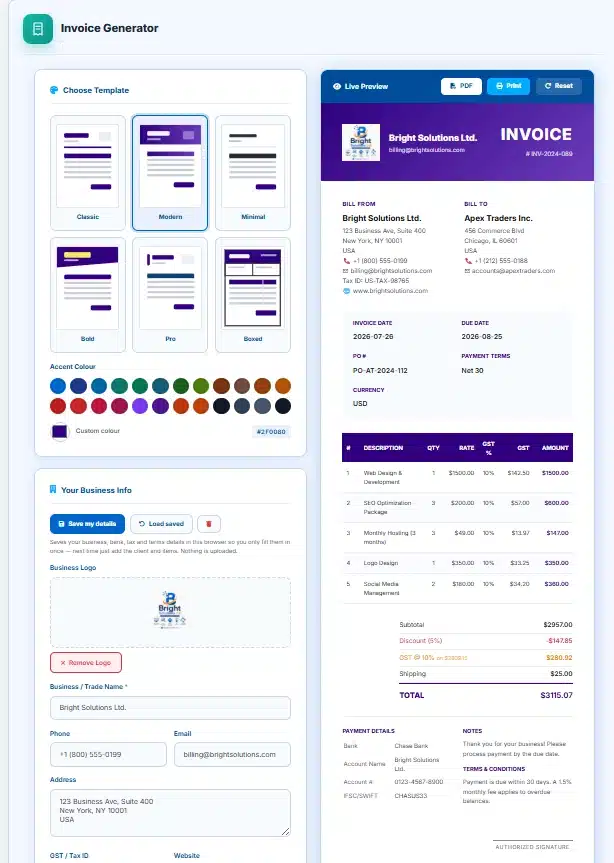
- Fill in your Business Info — name, address, contact, and tax ID.
- Add your Client's details in the Bill To section.
- Set the Invoice Number, date, due date, and currency.
- Add Line Items — each with description, quantity, and rate. The amount calculates automatically.
- Configure Tax, Discount & Shipping if applicable.
- Add Bank details and a UPI/payment link for QR code generation.
- Click Download PDF or Print — your professional invoice is ready!
Templates & Colors
Choose from 5 professional templates (Classic, Modern, Minimal, Bold, Professional) and customize the accent color using the swatches or color picker. The preview updates instantly.
QR Code
Enter your UPI ID, payment URL, or any link in the UPI / Payment Link field. A scannable QR code is generated automatically and printed on the invoice, making it easy for clients to pay instantly.
Tax & Discount
Enter a discount % (applied to subtotal first), then tax/GST % (applied after discount). Shipping is added last. All totals recalculate live. You can also customize the tax label (GST, VAT, etc.).
Building an invoice that adds up
1. Put your own details in once
Your name, address, tax number, bank details and payment link. Press Save my details and they are remembered in this browser, so the next invoice starts with only the client and the work left to fill in.
2. Add the client and the invoice numbers
Invoice number, date, due date and a purchase order reference if the client works that way. The dates default to today and thirty days out, which is the most common arrangement.
3. List the work, line by line
Description, quantity and rate. The amount for each line and the running subtotal are worked out as you type, so there is no arithmetic left for you to get wrong.
4. Set the tax rate once
One rate in the Tax / GST field covers every line. A line can override it with its own rate, and a line set to 0 is exempt. The invoice shows the tax grouped by rate, the way a GST or VAT invoice is expected to.
5. Add a discount, shipping and your terms
A percentage discount is spread across the lines before tax. Notes and terms sit at the foot, and the accent colour and template change how the whole thing looks.
6. Print it, or save it as a PDF
Both buttons open a clean print view containing the invoice and nothing else. Choose your printer, or choose Save as PDF as the destination for a crisp file where the text is still selectable.
How the tax rate actually works
Most invoices use one rate for everything, and a few need a different rate on one line. This tool handles both with a single rule, and the rule is worth knowing because it is the difference between an invoice that charges tax and one that quietly does not.
This is a fix rather than a feature. Until 29 August 2026 the invoice-level Tax field was collected, saved with your business details, and then ignored by the arithmetic entirely. Setting it to 18 and leaving the per-line column empty produced an invoice reading “Subtotal $100.00, Total $100.00” — no tax line, no warning, nothing to suggest anything was missing. If you have used this tool before and your invoices look untaxed, that is why, and it is worth checking the ones you sent.
Why the totals reconcile, line by line
An invoice that does not add up is worse than no invoice, because somebody has to work out which number is wrong. Three deliberate choices keep this one consistent.
The discount is spread across the lines, not taken off the end. A 10% discount reduces every line by 10%, and each line is then taxed on its reduced value. That is how a trade discount is normally treated, and it means the tax shown against each line still matches the total tax at the foot.
Each line is rounded to two decimals before anything is added up. Rounding at the end instead would let the parts disagree with the whole by a penny or two — the kind of discrepancy that gets an invoice queried.
Tax is grouped by rate. If some lines are at 18% and others at 5%, the foot of the invoice shows each rate separately with the value it applies to. A client’s accounts department needs that; a single blended tax figure is not enough for them to post it.
Writing money the way money is actually written
This is the other thing that changed on 29 August 2026, and it affected every figure on every invoice this tool has ever produced.
Amounts were printed by gluing a currency symbol to a number with two decimal places and nothing else. A large invoice therefore read $1234567.89, with no separators at all. Now every figure is formatted the way its currency is written, using the conventions catalogued in ISO 4217 and applied by the browser’s own number formatter.
Amount in words, and why an invoice carries it
Under the total, the invoice now spells the figure out: Seventy-Seven Thousand Rupees only. This is standard practice on Indian invoices and common on commercial documents everywhere, for one practical reason — a misplaced decimal point is invisible in digits and obvious in words. Seventy-seven thousand and seven hundred and seventy cannot be confused once written out.
Indian numbering is used for the rupee and the taka, so you get lakhs and crores rather than millions. Every other currency is written in thousands and millions. Currencies with no minor unit, such as the yen, are written as whole amounts with no “and no paise” tacked on the end.
Getting paid: bank details, UPI and the QR code
An invoice that does not say how to pay it gets paid late. The payment panel takes bank name, account name, account number and the routing code your bank uses — IFSC, SWIFT, sort code, routing number — and prints them in a block the client can copy from.
The UPI or payment link field turns into a QR code on the invoice. Point a payment app at it and the details are filled in automatically, which for Indian clients removes the most common source of delay and of typos in account numbers.
One honest caveat: the QR code is drawn by a small library loaded from a public CDN, and some office and campus networks block those. Until now, when that happened the invoice simply went out with no payment handle on it at all. It now prints your UPI ID or payment link as text instead, and the panel tells you why there is no square. The invoice remains payable either way.
Saving your details, and what is not saved
Your business details, bank details, currency, tax rate, payment terms and standard notes are stored in this browser when you press Save my details. Nothing is sent anywhere — it is your browser’s own storage, on your own machine, and clearing your browsing data clears it.
Client details, line items, dates and the invoice number are deliberately not saved. Those change with every invoice, and restoring last week’s client onto this week’s invoice is a mistake nobody wants a tool to make for them.
What “Download PDF” does, precisely
It opens your browser’s print view containing the invoice and nothing else — no page header, no navigation, no advertising. Choose Save as PDF as the destination and you get a PDF where the text is real text: selectable, searchable and copyable, at whatever resolution the reader wants.
This is deliberately not an image-based export. Tools that render an invoice to a picture and wrap it in a PDF produce a file that looks fine and cannot be searched, copied or read by an accounts system. Using the browser’s own PDF export avoids that entirely, at the cost of one extra click in the print dialogue.
What this tool does not do
Worth being clear about, so it is not discovered at an awkward moment:
- It does not file anything. It produces a document. Registering the invoice, filing returns and generating an e-invoice reference number are done through the GST portal or your accountant’s software.
- It does not keep a numbering series. The invoice number is a field you fill in. Tax rules generally require a consecutive series — keeping that consecutive is on you.
- It has no client list and no history. Each invoice is made and downloaded. Nothing is stored on any server, which is also why there is no account and no subscription.
- It does not split GST into CGST, SGST and IGST. The tax is shown as a single rate per line, grouped by rate. If your client needs the split, check what your state requires on the CBIC tax information portal.
- It is not tax advice. Which rate applies to your work is a question for your accountant, not for a web page.
Questions people ask while raising an invoice
I set the tax rate and the invoice shows no tax. What happened?
That was a genuine defect, fixed on 29 August 2026. The invoice-level rate is now applied to every line whose own Tax % is blank. If you are looking at an old invoice you produced with this tool and it shows no tax, it was not applied, and the invoice will need reissuing.
Can I use a different tax rate on one line?
Yes. Type the rate into that line’s Tax % box and it overrides the invoice rate. Type 0 and that line is exempt while everything else stays taxed.
Is the discount taken before or after tax?
Before. The discount is spread proportionally across the lines and each line is then taxed on its discounted value, which is the normal treatment for a trade discount and keeps the per-line tax consistent with the total.
Is shipping taxed?
Not by this tool — the shipping or fee amount is added after tax. If the freight on your invoice is taxable, add it as an ordinary line item with a rate instead, and it will be taxed like everything else.
Why does the rupee total group as 12,34,567 rather than 1,234,567?
Because that is how the rupee is written. Indian numbering groups in lakhs and crores, and the invoice follows the currency you chose rather than your location. Choose dollars and the same figure groups in thousands.
Is my data uploaded anywhere?
No. Everything happens in your browser, including the PDF, and your saved business details live in your browser’s own storage. There is no server holding your client list or your invoices, because there is no server involved.
Can I put my logo on it?
Yes, and the image never leaves your machine either — it is read locally and drawn straight into the preview. You can also change the accent colour and choose between templates.
Why is there no QR code on my invoice?
Either you have not entered a UPI or payment link, or your network blocked the library that draws it. In the second case the payment link is printed as text instead and the panel says so, so the invoice is still payable.
Can I invoice in one currency and be paid in another?
The invoice is written in the currency you choose. If you need to state a conversion, our currency converter will give you a European Central Bank reference rate to quote alongside it.
Is this valid as a tax invoice?
It produces the fields a tax invoice normally needs — both parties’ details and tax numbers, an invoice number and date, line items, rate, tax per rate and total. Whether that satisfies your obligations depends on your country, your registration and your line of business, and that is a question for your accountant.
Other tools that come up around invoicing
- Currency Converter — for the reference rate to quote when you invoice a client abroad.
- Number to Words Converter — for writing an amount out in full on a cheque or a contract.
- Percentage Calculator — for working out a margin, a markup or a part payment.
- Quotation Generator — the same document, before the work is agreed.
- Receipt Generator — for what you send once the invoice has been paid.