How to use the word counter
Step 1 — Type or paste your text
The five counters at the top — words, characters, sentences, paragraphs and reading time — update on every keystroke. There is no button to press and no limit on how much you paste; a full chapter counts as fast as a tweet.
Step 2 — Set a writing goal
Enter a target and choose whether it is counted in words, characters, or characters without spaces. The bar fills as you write and tells you exactly how many are left, then turns amber and reports the overshoot once you pass it.
Step 3 — Open the full breakdown
Eighteen measurements sit under the first tab: unique words, letters, digits, lines, average word and sentence length, longest sentence, longest word, syllables, words of three or more syllables, and reading, speaking and typing times.
Step 4 — Check how hard it is to read
The Readability tab scores your text on Flesch Reading Ease and five grade-level formulas, with a plain-English verdict — “Plain English, average sentence 19.8 words” — instead of a bare number.
Step 5 — See which words you leaned on
Keyword density lists your most-used single words, two-word phrases and three-word phrases with counts and percentages. Two hundred common words such as the and of are hidden by default; one checkbox brings them back.
Step 6 — Check it fits
Character limits measures your text against fifteen real limits at once — SEO title, meta description, X, SMS, Instagram, LinkedIn, YouTube, Google Ads and more — each with a bar that turns red and tells you how many characters over you are.
About the word counter
This tool counts the words, characters, sentences and paragraphs in anything you type or paste, live as you write, and then goes further: it estimates how long the text takes to read aloud or in silence, scores how difficult it is to read, shows which words and phrases you have used most, and checks the length against the character limits that search engines and social platforms actually enforce. It is free, needs no account, and the text never leaves your browser.
Every figure is calculated by JavaScript inside this page. Nothing is uploaded, nothing is logged, and nothing is saved when you close the tab — which also means you should keep your own copy of anything you have drafted here.
Who this is for
- Students writing to an essay limit, where being under counts against you as much as being over.
- Writers and editors tightening prose, using average sentence length as the signal for where to cut.
- SEO and content teams fitting titles and meta descriptions, and checking a draft has not fixated on one phrase.
- Social and email marketers who need to know whether a line survives the platform’s cut-off.
- Anyone writing for a general audience who wants a reading-level check before publishing.
How the counting actually works
Most word counters split text on spaces. That is fast, and wrong often enough to matter. This one uses rules you can predict:
A word is a run of letters or digits. Hyphens, apostrophes and dashes inside a word do not break it, so state-of-the-art is one word and so is don’t. Numbers keep their separators, so 3.5 and 1,000 each count once rather than twice.
Chinese and Japanese characters are counted individually. Those scripts are not written with spaces between words, so splitting on whitespace would report an entire paragraph as one word. Counting each character is the same convention word processors use. Korean, which does use spaces, is counted by word.
Sentences survive abbreviations. Dr., Mrs., etc., initials such as J. R. Smith, and decimals such as 3.5 are protected before the text is split, so they do not each end a sentence. A final sentence with no full stop still counts — a heading or a note ending mid-thought is not invisible.
Paragraphs follow blank lines. If your text has blank lines between blocks, each block is a paragraph. If it has none, each non-empty line counts as one, which is what people expect from a pasted list.
Characters are counted twice over — with spaces and without — because platforms differ in which one they enforce.
Reading time, speaking time and typing time
Reading time uses 238 words per minute. That figure is not a guess: it is the average silent reading rate for English non-fiction from a 2019 meta-analysis by Marc Brysbaert covering 190 studies and more than 18,000 participants. Fiction is read faster, around 260 words per minute, and reading aloud is much slower, around 183.
Speaking time uses 140 words per minute, a comfortable presentation pace — fast enough not to drag, slow enough for an audience to follow. Typing time uses 40 words per minute, roughly the average for an experienced but untrained typist.
Treat all three as estimates for planning, not promises. A dense technical passage is read far more slowly than a story of the same length, and a paragraph of code or numbers slower still.
What the readability scores mean
Six formulas are shown. All of them work from the same two ingredients — how long your sentences are, and how long or how many-syllabled your words are — and they disagree with each other by design, which is why the average of the grade formulas is shown too.
- Flesch Reading Ease runs from 0 to 100 and higher is easier. Roughly: above 80 is conversational, 60 to 70 is plain English and the level most publishers aim for, below 30 is academic or legal prose.
- Flesch–Kincaid Grade converts the same inputs into a US school grade, so 8.0 means an average 13-year-old should follow it.
- Gunning Fog weighs words of three or more syllables, which makes it harsh on technical vocabulary.
- Coleman–Liau uses letters per word instead of syllables, so it does not depend on syllable guessing.
- Automated Readability Index uses characters per word and words per sentence.
- SMOG is the standard in healthcare writing, and needs at least 30 sentences to mean anything — below that the tool says so rather than printing a number.
What none of them measure is whether the writing is accurate, well organised, or worth reading. They were built for English prose, so scores for code, tables, bullet lists or other languages are not meaningful. Under about 100 words a single long sentence swings every score, so treat short samples as a hint.
The practical use is comparative. If a draft scores grade 14 and your readers are not specialists, the fastest fix is almost always splitting long sentences rather than hunting for shorter words.
Keyword density, without the myth
The Keyword density tab counts single words, two-word phrases and three-word phrases, and shows each one’s share of your total word count. Around 180 common words are hidden by default so the list is about your subject rather than about the and of.
There is no correct percentage. Keyword density as a ranking target died with the Panda update in 2011; repeating a phrase to hit a number is the behaviour search engines look for and penalise. What the panel is genuinely good for is noticing that you have written “content marketing” nine times in 400 words when three would read better, or spotting that the phrase you are actually targeting appears once in the whole draft.
Character limits worth knowing
The Character limits tab measures your text against fifteen limits at once. The ones people hit most often:
- SEO page title, about 60 characters. Google truncates by pixel width, not character count, so a title full of wide letters is cut earlier than one full of narrow ones. Sixty is the safe approximation.
- Meta description, about 160 characters. Same pixel caveat, and Google frequently rewrites descriptions anyway.
- X post, 280 characters. Every link counts as 23 characters however long it is, and images do not count.
- SMS, 160 characters for a single message — but only 70 if the text contains an emoji or any non-Latin character, because the message switches to a different encoding.
- Instagram 2,200 and LinkedIn 3,000, though only the first 125 and 210 characters respectively show before the “more” link, which is the number that really matters.
Where this fits with the other tools
Two of the panels here exist as tools in their own right, with more room to work in: Keyword Density Checker goes deeper into phrase analysis, and Social Media Character Counter is built around the platform limits alone. Words to Minutes converts a script to speaking time at a pace you choose, which is the better tool if you are timing a talk rather than writing one.
Around it: Text to Speech reads a draft back to you, which catches clumsy sentences no formula will. Word Case Converter fixes capitalisation in pasted text before you count it, Text Diff Checker shows what changed between two versions, Meta Tag Generator writes titles and descriptions inside the limits above, and Plagiarism Checker covers the other half of an academic submission.
Frequently asked questions
How do I count the number of words in my text?
Paste or type it into the box. The word count updates as you go, with characters, sentences, paragraphs and reading time alongside it — there is no button to press and no upload step.
Is the word counter free, and is my text private?
Free, with no account and no limit. Every count is calculated by JavaScript inside your browser, so the text is never uploaded, never logged and never stored — closing the tab discards it. Sensitive drafts stay on your device.
How many words is one page?
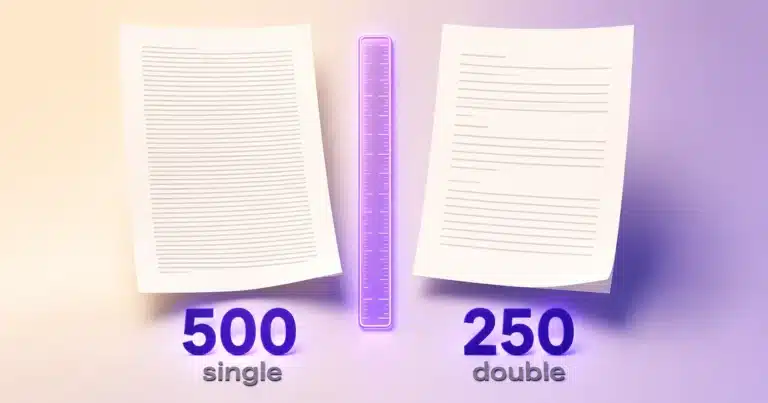
About 500 words on a single-spaced page or 250 double-spaced, in 12pt with normal margins — so 1,000 words is roughly two pages single-spaced. Font, spacing and margins move the figure, so treat it as an estimate rather than a rule.
How long will my text take to read?
At 238 words per minute, 1,000 words is about four minutes and 2,000 about eight and a half. That rate is the measured average for silent reading of English non-fiction; dense technical material is slower.
Does it count characters with and without spaces?
Both, side by side. Some fields count spaces and some do not, and the difference on a 160-character meta description is around 25 characters — enough to matter.
Is a hyphenated word one word or two?
One. State-of-the-art, self-service and twenty-one each count once, as do words containing apostrophes. Numbers keep their decimal points and thousands separators, so 1,000 is one word.
How does it count Chinese or Japanese text?
Each Chinese character and each kana counts as one word, because those scripts are written without spaces between words — the same convention word processors use. Korean is written with spaces, so it is counted by word.
Why does my word count differ from Microsoft Word or Google Docs?
Small differences are normal, because every counter draws the line between “word” and “not a word” slightly differently. Standalone numbers, hyphenated compounds, URLs, emoji and text inside tables or footnotes are the usual culprits. On ordinary prose the gap is well under one per cent.
How are sentences counted?
By sentence-ending punctuation, with abbreviations such as Dr. and etc., initials, and decimals such as 3.5 protected first so they do not each end a sentence. A trailing fragment with no full stop still counts, which matters for headings and notes.
What is a good Flesch Reading Ease score?
For a general audience, 60 to 70 — plain English at around an 8th to 9th grade level. Marketing and news writing often sits higher, at 70 to 80. Below 50 you are writing for specialists, which is fine if that is who is reading.
How do I make my writing easier to read?
Split the long sentences first. Sentence length is the input every one of these formulas weighs most heavily, and it is also what genuinely tires a reader. After that, replace the longest words where a short one carries the same meaning — but do not swap a precise technical term for a vague everyday one just to move a number.
What keyword density should I aim for?
None. There is no target percentage, and there has not been one since 2011 — writing to hit a density figure is exactly the pattern search engines treat as spam. Use the panel to notice repetition you did not intend, not to tune a number.
Why are common words missing from the keyword list?
Two hundred of them — the, and, of, is and their relatives — are hidden so the list says something about your subject. Untick “Hide common words” to see the raw frequencies.
Can I set a target word count?
Yes. Enter a goal, pick words or characters, and the bar tracks how many you have left. Pass the target and it reports how far over you are instead of stopping at 100%.
Does it save my text?
No, deliberately. Nothing is written to your device or to a server, so refreshing or closing the tab loses the text. Use Download .txt before you leave if you have drafted something here you want to keep.
What does “Copy report” do?
It copies the statistics rather than the text — word, character and sentence counts, averages, reading and speaking times and the two Flesch scores — as plain text ready to paste into an email, a brief or a document.
Is there a limit on how much text I can paste?
No fixed limit. Everything runs in your browser, so the practical ceiling is your device’s memory — a full-length manuscript counts without trouble, and the counters are throttled to one update per frame so typing stays smooth on long documents.