Passport photo requirements are written in millimetres, upload forms are written in pixels and kilobytes, and the two never appear on the same page. That mismatch is why so many applications get rejected over a photo that looked perfectly fine. Here is the conversion, the size rules for the main countries, and how to produce a compliant file from a photo you already have — free, in your browser.
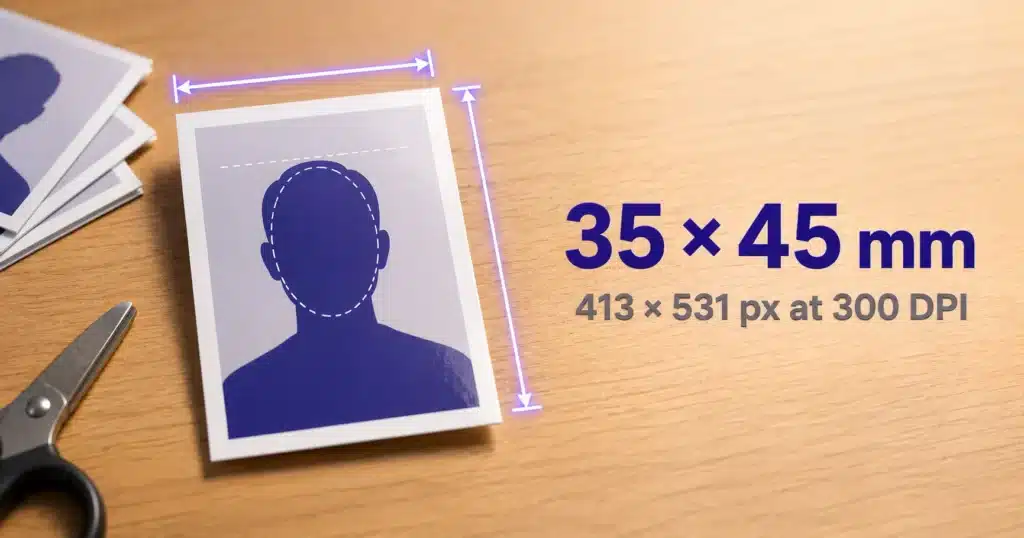
Quick answer: the standard passport photo size is 3.5 × 4.5 cm (35 × 45 mm), which at 300 DPI is 413 × 531 pixels. The United States is the main exception at 2 × 2 inches (600 × 600 px minimum). The free Passport Photo Maker crops to any of these sizes, meets a 20 KB or 50 KB upload limit, and can lay out a printable sheet — all in your browser.
13.5 × 4.5 cm in pixels
Millimetres describe a printed photo; pixels describe a file. The bridge between them is DPI (dots per inch), and the formula is simple:
pixels = millimetres ÷ 25.4 × DPI
| Resolution | 35 × 45 mm becomes | Use it for |
|---|---|---|
| 200 DPI | 276 × 354 px | Bare minimum; only if a form demands a tiny file |
| 300 DPI | 413 × 531 px | The standard answer — accepted almost everywhere |
| 600 DPI | 827 × 1063 px | High-quality printing, or forms that ask for large images |
If a form simply says “passport size photo” with no pixel guidance, 413 × 531 is the safe choice. Keep the aspect ratio exact — 35:45 simplifies to 7:9 — because stretching a photo to fit is one of the fastest ways to get it rejected.
2Sizes by country
| Country / use | Printed size | Digital requirement |
|---|---|---|
| India (passport, most govt forms) | 3.5 × 4.5 cm | 413 × 531 px at 300 DPI; many portals cap the file at 20–50 KB |
| Schengen / most of Europe | 35 × 45 mm | 413 × 531 px at 300 DPI |
| United Kingdom | 45 mm high × 35 mm wide | At least 600 × 750 px, file between 50 KB and 10 MB |
| United States | 2 × 2 inches (51 × 51 mm) | 600 × 600 px minimum, 1200 × 1200 px maximum — square |
| Australia, Canada and others | Varies | Check the official page — many follow 35 × 45 mm |
Head size matters as much as the frame. The UK asks for the image of your head, crown to chin, to be 29–34 mm within the 45 mm height. The US asks for 25–35 mm (1 to 1⅜ inches), or 50–69% of the total image height for digital photos. A photo cropped too tight or too loose fails even at perfect dimensions.
3Making the file, step by step
- Start with a good source photo. Plain light background, even lighting with no shadow behind you, face square to the camera, neutral expression, eyes open and visible, no hat, no sunglasses. Shoot against a white wall in daylight if you can — everything after this is cropping, not rescuing.
- Open the Passport Photo Maker and pick your size. In the Passport Photo Maker, choose 35 × 45 mm, 2 × 2 in, or a custom size in millimetres, and leave the resolution at 300 DPI. The exact pixel dimensions appear under the preview.
- Frame the face. Drag the photo to position it and use the zoom slider until the head sits inside the dashed oval, with a small margin above the hair and the chin above the lower guide line. The guides are preview-only — they never appear in the downloaded file.
- Set the file-size limit. If the form caps uploads at 20 KB or 50 KB, choose that target and the tool steps the JPEG quality down until the file fits, giving you the best-looking image that still clears the limit.
- Download, or print a sheet. Save the single photo, or build a print sheet — six copies on a 4 × 6 inch print, about thirty on an A4 page at 300 DPI, with cut lines. Prefer to do it manually? The Smart Image Cropper, Image Resizer and Image Compressor do the same three steps separately.
All three tools run on a canvas inside your browser. Your photograph is never uploaded to us — which matters, because a passport photo is exactly the kind of file you should not be feeding to unknown servers.
4Hitting a KB limit without wrecking the photo
Indian government portals in particular are strict, often asking for 20–50 KB. The order of operations decides whether the result looks acceptable:
| Limit | Approach | Expected quality |
|---|---|---|
| Under 20 KB | 413 × 531 px, quality around 55–65 | Acceptable on screen; slight softness up close |
| Under 50 KB | 413 × 531 px, quality around 75–85 | Good — this is the comfortable target |
| Under 100 KB | 413 × 531 px, quality 90+, or 600 × 771 px | Excellent, effectively lossless to the eye |
| 50 KB – 10 MB (UK digital) | 600 × 750 px or larger, quality 90+ | Best quality; no need to compress hard |
Resize before you compress, never the other way round. A 4,000-pixel-wide photo crushed to 20 KB looks terrible; the same photo resized to 413 px first and then compressed looks fine, because you removed the weight where it did not matter. Our guide to compressing an image to 20 KB covers that logic in more depth, and if you are filling an exam form, the photo and signature guide lists the specifications the big Indian exam portals ask for.
5What actually gets photos rejected
- Shadows. On your face or on the background behind you. The single most common failure.
- Wrong background. Plain and light — white or off-white. Patterned walls, doors and curtains fail.
- Expression and eyes. Mouth closed, neutral expression, eyes open and unobstructed. No hair across the eyes.
- Glasses. Most authorities now want them off unless medically necessary. Never tinted.
- Editing. No filters, beauty modes, or retouching. Photos “unaltered by computer software” is a literal requirement in several countries — cropping and resizing are fine, smoothing your skin is not.
- Age. Taken within the last six months, and it must look like you do now.
- Stretching. A photo squeezed into the wrong aspect ratio is obvious and gets bounced.
Our tools handle geometry, not compliance. They crop, resize and compress to the exact numbers you give them — they do not verify head position, background colour or biometric rules. Before submitting, check the current requirements on the official page for your country, since they change and vary by document type.
6Frequently Asked Questions
What is 3.5 × 4.5 cm in pixels?
At 300 DPI it is 413 × 531 pixels — the standard answer for passport photos. At 600 DPI it is 827 × 1063 px, and at 200 DPI it is 276 × 354 px. The formula is millimetres ÷ 25.4 × DPI.
What is the standard passport photo size?
35 × 45 mm (3.5 × 4.5 cm) is used by India, the UK, the Schengen countries and many others. The United States is the notable exception, requiring a square 2 × 2 inch photo, supplied digitally at 600 × 600 to 1200 × 1200 pixels.
How do I reduce my passport photo to 20 KB?
Set the size to 35 × 45 mm at 300 DPI and choose the “Under 20 KB” target in the Passport Photo Maker — it lowers the JPEG quality step by step until the file fits. Doing it manually, resize to 413 × 531 pixels first and then compress at roughly quality 55–65; resizing before compressing is what keeps the face sharp at tiny file sizes.
Can I take a passport photo with my phone?
Yes, provided the lighting is even, the background is plain and light, and someone else takes it from a couple of metres away using the rear camera. Selfies are usually rejected because the short distance distorts facial proportions.
Do I need to pay for a passport photo tool?
No. Cropping, resizing and compressing to the required dimensions and file size are ordinary image operations — the tools linked here do all of it free, with no sign-up and no watermark, and without uploading your photo anywhere.