User Guide
Enter your views
Use a real figure from YouTube Studio for a period you can verify — last 28 days is the usual choice. Guessing here makes every number that follows a guess.
Set the monetised-view percentage
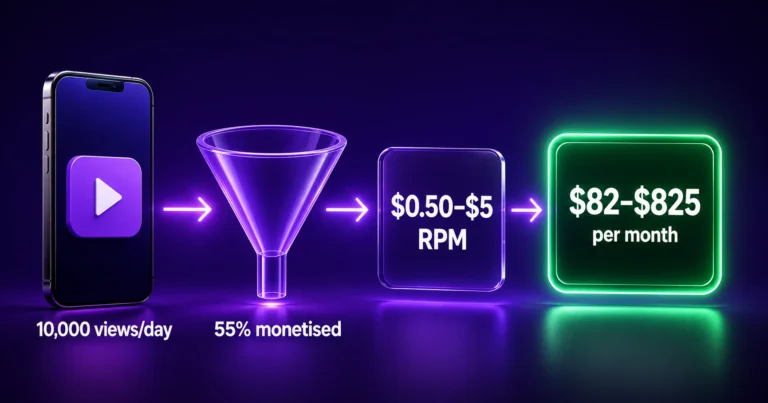
Not every view carries an ad. The default is 55%, which is a common range, but your own Studio analytics show the real figure under monetised playbacks. This single input moves the result more than most people expect.
Enter an RPM range, not a single number
The low and high fields exist because earnings are a range, never a point. If you have your own RPM in Studio, use it for both. If not, the defaults of $0.50 and $5.00 span most channels.
Read all three timeframes
Daily, monthly and yearly are shown together so you can sanity-check the scale. If the yearly figure looks implausible, the monetised percentage or the RPM is usually the reason.
Treat the output as a range
You will get a low and a high estimate. The truthful answer is “somewhere in there”, and the gap between them is itself information about how uncertain the estimate is.
Check your eligibility separately
Estimates only mean something once a channel is actually monetised. The thresholds are set out on YouTube Partner Program eligibility and are worth confirming there, since they change.
About the YouTube Money Calculator
This tool estimates YouTube ad revenue from views, the share of those views that carry ads, and an RPM range you supply. It is a modelling tool, not a prediction — and understanding why is the difference between a useful estimate and a misleading one.
The calculation
earnings = views × monetised share × RPM ÷ 1,000
Worked through with the defaults: 10,000 views, 55% monetised, RPM between $0.50 and $5.00.
10,000 × 0.55 = 5,500 monetised views. At the low RPM that is 5,500 ÷ 1,000 × $0.50 = $2.75. At the high RPM, $27.50. A tenfold spread from the same view count — which is the honest shape of YouTube earnings, and the reason any calculator quoting one number is overselling its accuracy.
RPM and CPM are not the same thing
Confusing these two is the most common error in this area.
CPM is what an advertiser pays per 1,000 ad impressions, before YouTube takes its share. RPM is what actually reaches you per 1,000 total views, after the revenue split and including views that never showed an ad.
RPM is therefore always the smaller and more useful number, and it is the one this calculator wants. If you enter a CPM figure you saw quoted somewhere, the result will be substantially too high. YouTube Studio reports both under Analytics → Revenue.
What moves RPM
| Factor | Effect |
|---|---|
| Viewer country | The largest single factor. Advertisers pay far more for some audiences than others. |
| Niche | Finance, software, insurance and legal topics attract higher bids than entertainment. |
| Season | Q4 is consistently strongest; January is consistently weakest. |
| Video length | Longer videos can carry mid-roll ads, raising revenue per view. |
| Format | Shorts monetise through a different pool and at much lower rates than long-form. |
| Advertiser suitability | Videos flagged as limited or unsuitable earn little or nothing. |
Ads are one income stream of several
This calculator models ad revenue only. For most established channels it is not the largest line. Sponsorships are frequently worth several times ad income at the same view count, because they are negotiated on audience value rather than auction rates. Affiliate links, memberships, Super Thanks, merchandise and paid products all sit outside what this tool measures.
Treat the figure here as a floor for a monetised channel, not a ceiling. YouTube’s monetisation overview sets out the full range of monetisation features.
Eligibility comes first
None of this applies until a channel is accepted into the YouTube Partner Program. The thresholds combine a subscriber count with either watch hours on long-form video or views on Shorts, and they have been revised more than once. Rather than repeat numbers that may have moved, check YouTube Partner Program eligibility directly — it is the only source that is current by definition.
Privacy
The calculation runs in your browser. No account is connected, nothing is submitted and no figures are stored.
Frequently Asked Questions
How accurate is this estimate?
It is exactly as accurate as the RPM you enter. The tool does the arithmetic honestly, but nobody can know your RPM without your Studio data — which is why it asks for a range rather than pretending to a single figure. With your own RPM from YouTube Studio, the estimate is reliable.
What is the difference between CPM and RPM?
CPM is what advertisers pay per 1,000 ad impressions before YouTube takes its share. RPM is what reaches you per 1,000 total views afterwards, including views that showed no ad. RPM is always lower, and it is the figure this calculator needs. Entering a CPM will inflate the result.
Why is the range between the low and high estimate so wide?
Because real YouTube earnings vary that much. Viewer country, niche, season and video length can each move RPM by a large multiple. A calculator that shows one number is hiding that uncertainty rather than resolving it.
What monetised-view percentage should I use?
Check YouTube Studio under monetised playbacks for your real figure. The 55% default is a common range, but it varies with audience, ad blockers and how much of your catalogue is fully monetised.
Does this include sponsorships and affiliate income?
No. It models ad revenue only. For many established channels sponsorships are worth several times ad income at the same view count, because they are priced on audience value rather than auction rates.
Do Shorts earn the same as long-form videos?
No. Shorts are monetised through a separate revenue pool and generally at much lower rates per view. If your views are mostly Shorts, use a correspondingly lower RPM or the estimate will be far too high.
Why do my earnings drop every January?
Advertiser budgets reset after the Q4 peak, and demand falls sharply. It is one of the most predictable patterns in the platform — a January RPM well below the December figure is normal, not a sign of a problem.
Is my channel data sent anywhere?
No. Nothing is connected to your account and no figures are submitted or stored. The calculation runs entirely in your browser from the numbers you type.